

Odoo app guide
Odoo Field Service: Customer Visits, Work & Materials
Odoo Field Service organizes work performed at customer locations. Tasks can be created manually or through configured Sales and Helpdesk workflows, with the relevant service, time and material records. Ever Digital helps define dispatch, execution and billing handoffs. Specialist routing, offline operation, customer-equipment monitoring and contract entitlement controls require explicit verification.
Official Odoo Partner · Ever Digital

Every visit needs an agreed reason and owner.
A service request may begin with a phone call, a helpdesk ticket or a sold installation. Decide which source should create the field task and what information must accompany it: customer, site, contact, access requirements, expected work and commercial basis. Duplicate tasks from several channels can make dispatch and billing unreliable.
Define who checks that the request is ready for assignment. A technician should not arrive only to discover missing access approval, an unknown device model or a part that was never ordered. The readiness decision belongs in the operating process.
Connect the visit to the surrounding business records.
A field task is the central work record, but it depends on commercial, stock and finance decisions.
| Handoff | Configuration question | Acceptance example |
|---|---|---|
| Request to task | Which source creates work and prevents duplication? | Create a visit from the chosen sales or support process. |
| Dispatch to technician | What establishes readiness and assignment? | Reassign an appointment while preserving the customer and work context. |
| Execution to evidence | Which time, materials and completion details are required? | Record an incomplete visit and the reason another visit is needed. |
| Completion to billing | Which work is chargeable and who reviews it? | Invoice approved work without charging covered or unperformed activity. |
Materials used at a customer site still need a stock explanation.
Identify the source of parts and consumables: a central warehouse, technician stock or a purchase for a specific job. Demonstrate how the chosen process records consumption and how unused or faulty parts return. Service product settings and stock configuration must agree with the real movement.
Do not assume that entering a material line proves the item was physically issued or that a customer should be charged. The business needs an agreed relationship between stock movement, technician reporting and commercial approval.
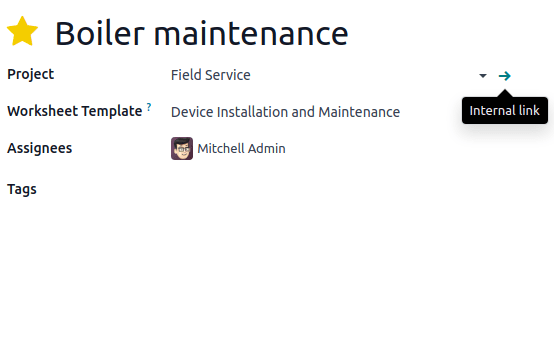
Odoo documentation · CC BY-SA 4.0 · CC BY-SA 4.0
Original documentation image, shown without altering the interface. The screenshot illustrates standard Odoo, not a customer implementation.
Design completion evidence around the work being performed.
A service worksheet can capture structured visit information. Odoo documents worksheet templates using Studio, which may affect the selected subscription plan. Define the fields, responsibilities and review process before deciding that a worksheet meets a technical or contractual requirement.
For HVAC, solar, security or power equipment, the technical team should provide the actual checks and acceptance criteria. The software does not independently validate engineering measurements or certify an installation. Avoid collecting sensitive site details that are unnecessary for the service record.
Separate advanced dispatch and equipment requirements.
These requirements need a demonstrated design and may require other apps, integration or development.
- Route optimization across complex constraints, live location feeds or dispatching from external systems.
- Guaranteed offline execution and later synchronization on the intended devices.
- Customer asset histories, runtime-triggered service and manufacturer telemetry.
- AMC entitlement, contract allowances, automated service coverage and specialized SLA enforcement.
Test a return visit as well as a successful first visit.
Choose a job that can be completed and another that encounters an unavailable part or access problem. Follow both through assignment, time, materials, customer communication and billing review. This reveals whether the system preserves an unfinished obligation instead of treating every closed task as a completed service.
Bring a job sheet, a service quotation, a parts issue example and an invoice to discovery. Ever Digital can use them to build a practical demonstration and identify the differences between standard task management and the specific controls your service business requires.
Questions businesses ask
How are field tasks created?
Odoo documents manual creation and creation through configured Sales or Helpdesk workflows. The right trigger depends on how your business authorizes a visit.
Are worksheets included without plan implications?
Worksheet templates use Studio according to Odoo documentation. Review the required subscription and configuration before committing to the worksheet design.
Is Field Service the same as Maintenance?
Field Service addresses work at customer locations. Maintenance focuses on equipment maintenance within the organization. A business may need both for different responsibilities.
Can annual maintenance contracts be handled automatically?
Contract billing and entitlement to individual visits are different requirements. Define coverage, exclusions and allowances, then verify the exact enforcement needed.
Sources and factual scope
Capabilities checked against official Odoo documentation. These are planning examples, not promises that every feature is included in a Starter package.
- Odoo Field Service documentation
- Odoo: creating tasks
- Odoo: field service product management
- Odoo: worksheets
- Odoo: planning an itinerary
Reviewed:
Ever Digital
Bring your real workflow to the conversation.
Tell us how you sell, stock, deliver or service. We will identify the standard apps, decisions and any extensions your implementation needs.
View Starter packages Current implementation fees and included scope are maintained on the Starter package pages. Odoo licences, hosting and custom work are separate.