

Practical guide
Connecting a Service Request to a Field Visit and Invoice in Odoo
A dependable field service workflow connects the original request, authorization to perform work, an assigned task, execution evidence and the correct billing decision. Odoo can connect configured Sales or Helpdesk processes with Field Service tasks. The implementation must define what is covered, what is chargeable and how incomplete work remains visible. Scheduling a task alone does not establish contract entitlement or completed service.
Official Odoo Partner · Ever Digital

Define the information needed before dispatch.
Capture the customer, site, reported need, contact and relevant equipment or service context. Identify whether the request is an installation, a chargeable repair or work claimed under an agreement. These distinctions affect authorization, materials and billing.
Decide which intake source creates the authoritative task. A call, email and sales order may all refer to the same visit; the process should avoid creating several independent obligations. Assign an owner to clarify incomplete information before a technician is sent.
Map the request-to-invoice handoffs.
Use the table to identify which decision needs to be demonstrated in the selected configuration.
| Handoff | Responsible decision | Evidence |
|---|---|---|
| Intake to authorization | Is the requested work permitted and commercially understood? | Accepted quotation or reviewed coverage decision. |
| Authorization to dispatch | Is the visit ready for assignment? | Site access, task scope and required parts are known. |
| Execution to review | What work actually happened? | Time, materials, findings and unfinished work are recorded. |
| Review to invoice | Which completed work is chargeable? | Approved billing basis linked to the commercial arrangement. |
Choose and test the task-creation trigger.
Odoo documents manual field tasks and creation from configured Sales or Helpdesk workflows. Demonstrate the chosen trigger with the actual service product and customer context. Check which project, task owner and commercial reference are created.
Then change the originating request or order. Determine how cancellation, extra work or an additional visit should be handled. Automation is useful only when the team also understands what happens after the original assumptions change.
Track issued, used and returned materials coherently.
A part may leave a central store, remain in technician stock, be used at a site or return unused. Decide how those movements are recorded and how material reporting relates to billing. The same item should not become an unexplained stock adjustment and a separate charge line with no common reference.
Test a faulty replacement and a visit where the required part is unavailable. Warehouse and service staff should agree what remains in stock and what work is still outstanding. The customer should receive a clear next step rather than a task marked complete for administrative convenience.
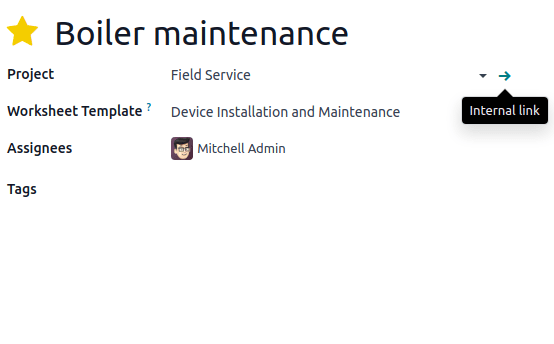
Odoo documentation · CC BY-SA 4.0 · CC BY-SA 4.0
Original documentation image, shown without altering the interface. The screenshot illustrates standard Odoo, not a customer implementation.
Collect evidence that supports the actual service decision.
Define the worksheet or completion information needed for the type of work. Technical owners should supply the checks and acceptance criteria. Odoo worksheet templates use Studio according to its documentation, so the required plan and setup must be reviewed.
A recorded measurement or checkbox does not independently certify engineering quality. Decide who reviews the evidence and authorizes completion. Collect only the site and customer information needed for the service, with appropriate access and handling.
Separate recurring billing from covered work.
An annual maintenance invoice can establish a commercial charge without automatically determining which visits, parts or call-outs are included. Define coverage dates, exclusions, allowances and approval rules. If the system must enforce them, test the exact behavior rather than relying on a contract name.
For mixed covered and chargeable work, show how the reviewer distinguishes the two before invoicing. This is particularly useful when a visit reveals additional damage or the customer requests work outside the original agreement.
Use four cases in a service pilot.
Together they test more than the simplest successful visit.
- A chargeable job completed on the first visit.
- A covered request with a documented entitlement decision.
- An incomplete visit requiring a part and a return appointment.
- Additional work that needs customer authorization before proceeding.
Review the evidence with service, stock and finance owners.
For each pilot case, ask the dispatcher to explain the next action, the technician to explain the work record and finance to explain the invoice basis. Check that the customer’s original request remains traceable even when several records or visits are involved.
Ever Digital can help configure the supported handoffs and assess specialist needs such as offline execution, route optimization or equipment telemetry. Bring a job sheet, service agreement, parts issue and invoice example to make the scope concrete.
Questions businesses ask
Can a sales order or helpdesk ticket create a field task?
Yes, through the relevant configured workflow documented by Odoo. Test the actual service product, task destination and commercial reference.
Does closing a task always mean it should be invoiced?
No. Completion, coverage and billing policy are separate decisions. Review the evidence and agreed commercial basis before creating a charge.
Are custom worksheets free of subscription implications?
Odoo documents worksheets using Studio. Confirm the applicable plan and configuration before including them in the solution.
What about offline work and route optimization?
They require specific verification for the intended devices and process. They should not be promised merely because Field Service tasks can be scheduled.
Sources and factual scope
Capabilities checked against official Odoo documentation. These are planning examples, not promises that every feature is included in a Starter package.
- Odoo: creating field service tasks
- Odoo: field service products
- Odoo: worksheets
- Odoo: planning an itinerary
- Odoo: time and materials invoicing
Reviewed:
Ever Digital
Bring your real workflow to the conversation.
Tell us how you sell, stock, deliver or service. We will identify the standard apps, decisions and any extensions your implementation needs.
View Starter packages Current implementation fees and included scope are maintained on the Starter package pages. Odoo licences, hosting and custom work are separate.