

Practical guide
Preparing Inventory Data Before an Odoo Migration
Prepare inventory migration data in the order the stock process depends on it: product identity, units, locations, traceability requirements and opening quantities. Clean and approve those records before a trial load, then reconcile the imported position to physical counts and finance. A successful import is only a technical result; business owners must verify that the stock can be bought, moved, sold and explained correctly.
Official Odoo Partner · Ever Digital
Give each uncertain record a decision owner.
Inventory spreadsheets often contain abbreviations understood by one employee, obsolete items and products created twice under different names. Before importing, decide who can confirm the correct identity and who approves changes. A migration team should not guess whether two similar descriptions represent the same item.
Keep the original source and a controlled cleaned version. Record important mappings and exclusions so the business can explain what happened to each source reference. This is useful when a supplier invoice or historic sales record later uses the old code.
Prepare the data in dependency order.
This sequence reduces rework because later records depend on the decisions made earlier.
| Order | Dataset | Decision to complete |
|---|---|---|
| 1 | Product identity | Internal references, names, variants and duplicate resolution. |
| 2 | Units and packaging | Purchase, stock and sales units with valid fixed conversions. |
| 3 | Stock structure | Warehouses, locations and the treatment of special stock. |
| 4 | Tracking | Which products require lots, serials and relevant dates. |
| 5 | Opening position | Quantities, identifiers, valuation and the cutover status of movements. |
Use variants only where the distinction is understood.
A model, size, rating or color can be a meaningful product distinction. Decide which attributes create variants and how supplier references map to them. Do not combine technically different items merely because they share a broad description, and do not create separate stock identities for harmless spelling differences.
Test a product sample with purchasing, warehouse and sales users. Each team should recognize the same item and understand how it is bought and supplied. This review often finds errors that a duplicate-text check cannot detect.
Validate conversions with physical examples.
Choose products bought in cartons, sold in pieces or managed in another unit. Confirm the fixed relationship and test a partial quantity. Packaging quantities and units have different roles, so the migration should preserve the intended meaning instead of storing every measurement as free text.
Variable weights, cable cutting, rolls of changing length and other transaction-specific measures require additional process design. Flag them before loading opening stock. A conversion that is correct for one receipt may be wrong for another.
Odoo documentation · CC BY-SA 4.0 · CC BY-SA 4.0
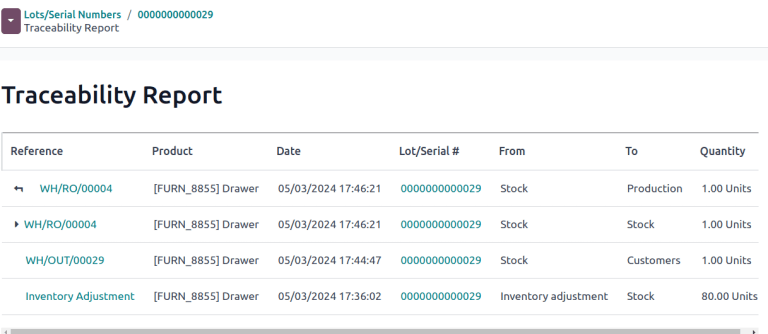
Original documentation image, shown without altering the interface. The screenshot illustrates standard Odoo, not a customer implementation.
Capture identifiers where the future workflow needs them.
Identify products that require lot or serial tracking and confirm the available opening identifiers. For dated goods, distinguish the relevant dates and the removal policy the business intends to use. Do not invent missing serial numbers or expiry information to make an import pass.
If the historic data is incomplete, agree a controlled remediation or scope decision with the responsible owners. The first live receipt, delivery and return should be able to preserve the traceability required for the chosen products.
Count using the same structure the new system will use.
An opening quantity needs a product, unit and location, plus tracking identifiers where required. Separate damaged, returned, restricted or customer-owned goods according to the agreed process. Identify stock already in transit so it is not counted at both ends or omitted entirely.
Finance should reconcile valuation independently. Physical quantity, product cost and the accounting opening position answer different questions. A matching grand total is insufficient if the wrong products or locations hold the quantities.
Use a trial file that includes difficult records.
A small representative trial is more informative than importing only easy items.
- A product with several supplier references.
- A variant family with similar descriptions.
- A carton-to-piece conversion and a partial quantity.
- A tracked item with its actual lot or serial details.
- Stock in more than one location and a transfer in progress.
- An obsolete or ambiguous record that should be excluded or resolved.
Validate the first transaction after the opening load.
Receive an item, transfer it, sell or consume it and process a return where relevant. Confirm that staff can select the correct product and unit, identify stock and reconcile the movement. This checks whether the migrated data supports real work rather than merely appearing in a list.
Ever Digital can help assess source files, define mappings and plan reconciliation. Bring representative exports and describe the areas where staff currently distrust the stock figures. Those uncertainties should become explicit migration decisions before launch.
Questions businesses ask
Can missing serials be filled with invented values?
No. Missing identifiers require a controlled business decision or remediation. Fabricated tracking data would create a false traceability record.
Is a total stock value enough to validate migration?
No. Quantities, locations, identifiers and financial valuation need appropriate checks. A total can agree while the underlying stock is wrong.
Should obsolete products be imported?
Only if there is a defined operational, historical or reporting need. Keep them from confusing active purchasing and selling, and preserve an appropriate archive.
What should happen after a successful trial import?
Run representative stock transactions and obtain approval from data, warehouse and finance owners. Resolve differences before scheduling the final cutover.
Sources and factual scope
Capabilities checked against official Odoo documentation. These are planning examples, not promises that every feature is included in a Starter package.
- Odoo: export and import data
- Odoo: units of measure
- Odoo: product variants
- Odoo: lots
- Odoo: serial numbers
- Odoo: inventory counts
Reviewed:
Ever Digital
Bring your real workflow to the conversation.
Tell us how you sell, stock, deliver or service. We will identify the standard apps, decisions and any extensions your implementation needs.
View Starter packages Current implementation fees and included scope are maintained on the Starter package pages. Odoo licences, hosting and custom work are separate.