

Industry blueprint
Odoo ERP for Field Service Companies in Iraq
Odoo Field Service can organize customer-site tasks and connect them with sales, time, products and invoicing according to the configured workflow. Ever Digital helps define how a request becomes an assigned job, what technicians record and who approves completion. Equipment installation, technical service and repeat visits need clear task and billing rules. Offline operation, advanced dispatch optimization, GPS tracking, specialist forms and external integrations must be verified separately.
Official Odoo Partner · Ever Digital

The first operational handoffs
- 01Capture and qualify the request
- 02Create the job
- 03Assign and prepare
A service request should become a job with enough context to complete it.
A field team may receive work by phone, message, email or a salesperson’s promise. A technician then needs the customer, site, equipment, reported issue, access arrangements, required parts and the expected result. If that information lives in several conversations, the first visit can become a discovery trip that the customer thought was already resolved.
Define the minimum information needed before a job is assigned. Odoo Field Service tasks can be created manually or through documented Sales and Helpdesk workflows. The design should choose the right entry point for each type of work and prevent duplicate tasks for the same request. Assignment is only useful when the task contains the information and authorization needed at the site.
Ever Digital · Odoo
Your Odoo industry blueprint
Follow the work from the first request to the operational result. Each stage shows the Odoo app and the configuration decision behind it.
- 01
Capture and qualify the request
- Odoo app
- Helpdesk or Sales
- Configuration decision
- Customer, site, issue and commercial authorization.
- Operational outcome
- The work begins with enough context to plan.
- 02
Create the job
- Odoo app
- Field Service + Project
- Configuration decision
- Task type, stages and required information.
- Operational outcome
- The request becomes an accountable work record.
- 03
Assign and prepare
- Odoo app
- Field Service + Inventory
- Configuration decision
- Technician, schedule, access and parts readiness.
- Operational outcome
- The visit can proceed under the agreed constraints.
- 04
Record the work
- Odoo app
- Field Service
- Configuration decision
- Time, product use and any scoped worksheet.
- Operational outcome
- The task explains what happened on site.
- 05
Review completion
- Odoo app
- Project + Field Service
- Configuration decision
- Evidence, follow-up work and acceptance responsibility.
- Operational outcome
- Operational completion has a clear meaning.
- 06
Invoice and follow up
- Odoo app
- Sales + Accounting
- Configuration decision
- Fixed-price or approved time/materials policy.
- Operational outcome
- Charges follow the agreed commercial basis.
Choose the entry point that matches the commercial relationship.
A paid installation, a support request and an internally scheduled visit need different intake rules even if the same technician performs them.
| Work trigger | Odoo starting point | Question to answer |
|---|---|---|
| Confirmed service sale | Sales connected to the configured field-service task creation. | What service product, project and billing rule create the intended job? |
| Customer support issue | Helpdesk with a reviewed handoff to Field Service. | Who qualifies the request and authorizes a site visit? |
| Manually planned visit | A task with agreed customer, site and work details. | How is the commercial authorization or contract context recorded? |
| Repeat or contracted work | A defined scheduling and entitlement process. | What creates the next visit, and what work is included or chargeable? |
Plan the visit around people, place and readiness.
A scheduler needs the right technician, available time and enough information to avoid assigning work that cannot proceed. Odoo’s documented planning and itinerary features can support the visit view, but a business may need additional constraints such as skills, permits, access windows, multiple technicians or parts availability.
Record which constraints are mandatory and test their actual behavior. Do not assume that a calendar automatically performs optimized dispatch or prevents every invalid assignment. Travel planning, live GPS, geofencing and route optimization should be assessed against specific requirements and the deployment environment.
Recommended Odoo apps
| Odoo app | Why this app | Example in your business | Scope |
|---|---|---|---|
| Field Service | Organize customer-site tasks and the configured technician workflow. | Assign a visit with customer, site, work details and completion responsibility. | Standard Odoo |
| Sales | Connect the agreed service offer with task creation and billing policy. | Create a job from a confirmed installation service order. | Standard Odoo |
| Project | Structure the work and its task records. | Organize stages and responsibilities for several related site tasks. | Standard Odoo |
| Inventory | Record the agreed stock movements for service materials. | Issue a required component and reconcile an unused return. | Custom or optional |
| Helpdesk | Qualify support requests before a field visit is authorized. | Escalate a customer issue into the reviewed on-site process. | Custom or optional |
| Accounting | Review service invoices, payments and financial records. | Invoice approved time and materials under the agreed policy. | Standard Odoo |
Availability depends on the Odoo edition, hosting and subscription. Configuration, data migration and training are implementation work. Specialist connectors and extensions require a separate scope.
Make the on-site record useful to the next person.
A good task record explains what was found, what was done, which parts were used and what remains unresolved. Time entries can support effort tracking and the agreed invoice policy. Product use should connect to the commercial and stock design rather than appear only as a free-text note that finance cannot reconcile.
Worksheets can structure information for technicians. Odoo documents worksheet templates through Studio, and activating that functionality can affect the required plan. The form should collect evidence that someone actually reviews; a long checklist with no decision owner adds work without improving service. Scope specialized signatures, certificates or mandatory validation rules explicitly.
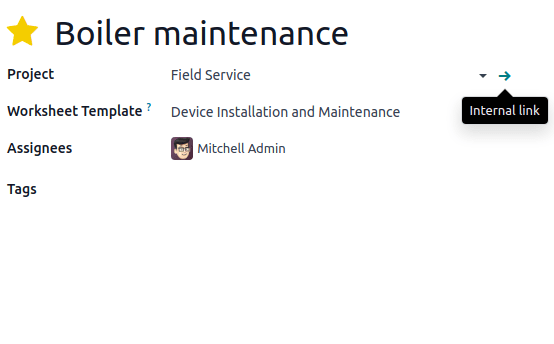
Odoo documentation · CC BY-SA 4.0 · CC BY-SA 4.0
Original documentation image, shown without altering the interface. The screenshot illustrates standard Odoo, not a customer implementation.
A part taken to site needs a stock and charging rule.
Decide whether materials are issued from a warehouse, carried in technician stock, purchased for a particular job or supplied by the customer. Those ownership and movement differences affect availability and cost. A field-service product entry should not be assumed to settle every van-stock or replenishment requirement without testing the configuration.
The pilot should include a part used, a part returned unused and a required item that was not available. Agree who approves substitutions and whether a customer must authorize additional charges. If technician stock, offline scanning or a separate mobile system is required, define how its movements reconcile with Odoo Inventory.
Completion, acceptance and invoicing are related but distinct.
A technician may finish the physical task while a supervisor still needs to review the evidence. The customer may accept part of the work, or another visit may be required. Define which status means the job is operationally finished and which event authorizes billing.
The invoice basis might be a fixed service, approved time and materials, a milestone or an existing agreement. Demonstrate the intended documents for a normal visit and an exception. Contract entitlements, service-level penalties and specialist approval controls should be assessed separately rather than assumed to follow automatically from a task marked done.
Equipment and technical installation companies: keep delivery and site work connected.
Installation businesses benefit from a task that refers to the commercial commitment and the equipment that must be available, while keeping the physical stock movement explicit.
- Equipment installation companies: confirm the equipment identity, delivery timing, site readiness and handover requirements before assigning installation.
- Technical installation companies: define the scope of work, required skills, access conditions and evidence needed for technical review.
- Separate equipment delivery, installation progress, commissioning or testing and customer acceptance where they are different contractual events.
- Use qualified reviewers for technical acceptance; a completed ERP task is not a substitute for a required certificate or engineering sign-off.
Test the actual field environment in Iraq.
Technicians may work across different sites, devices, languages and network conditions. The acceptance plan should include the phones or tablets they will use, the expected connection quality and the information they can access. Do not assume offline task operation or background synchronization without a verified solution for the specific workflow.
Agree English, Arabic or Sorani terminology and role-based training. For finance, establish company currency, transaction currencies, payment terms and reconciliation. Any local payment connector, statutory report or customer-specific security requirement is reviewed separately. The public website does not promise support for every device or connection condition.
Migrate open work with a clear owner and status.
Historic notes can be useful, but the first priority is an accurate operational opening position that the team can act on.
- Clean customers, service sites, contacts and equipment references needed by the task workflow.
- Agree task types, stages, required evidence and the owner of assignment, completion review and billing.
- Import open jobs, agreed commitments and required contract context without duplicating already completed work.
- Test a sales-created task, a support escalation, a parts shortage, a follow-up visit and a disputed charge.
- Reconcile time, product use, stock and invoices before expanding the rollout to every team.
Use the first release to make one service cycle dependable.
A focused implementation can begin with a defined job type, a small technician group and a clear billing model. Advanced dispatch, broad contract management and multiple external systems can follow an agreed roadmap once the core record is reliable. Ever Field can also be discussed where your wider Ever Platform needs justify it; any connection and current capability must be assessed for your scope.
Bring a service request, job sheet and invoice example to Ever Digital’s assessment. We can identify standard Odoo capabilities, configuration, Studio or optional applications, and custom work, then set acceptance tests and training. Package pages provide current standard inclusions; the actual field-service scope determines the implementation effort.
Questions businesses ask
Can Odoo create a field job from a sales order?
Odoo documents task creation from configured service products and sales orders. The product, project and billing setup should be tested so the correct task is created without duplicates.
Can a Helpdesk ticket lead to a technician visit?
Odoo documents a Helpdesk-to-Field-Service workflow. The implementation should define who authorizes the visit, what information is transferred and how the ticket and task are closed.
Are custom worksheets included in every Odoo plan?
Odoo worksheets use Studio, and enabling them can affect the required plan. We verify the plan and application scope before promising a particular form or workflow.
Will technicians be able to work offline?
Offline operation is not assumed. It must be verified for the exact application, device and workflow, including synchronization and conflict handling if a separate solution is used.
Does the calendar optimize routes and enforce every scheduling rule?
A planning view is not a guarantee of advanced optimization. Skills, access windows, travel, multi-person assignments and other constraints should be specified and tested against the proposed solution.
Can we bill time and parts used during a visit?
Odoo has documented time-and-materials workflows. The service product, time entries, product use, approval and invoice policy must be configured and reconciled in a representative pilot.
Sources and factual scope
Capabilities checked against official Odoo documentation. These are planning examples, not promises that every feature is included in a Starter package.
- Odoo: creating field-service tasks
- Odoo: planning an itinerary
- Odoo: field-service worksheets Worksheet functionality uses Studio; verify the applicable plan.
- Odoo: field-service product management
- Odoo: invoicing time and materials
- Odoo Helpdesk documentation
Reviewed:
Ever Digital
Bring your real workflow to the conversation.
Tell us how you sell, stock, deliver or service. We will identify the standard apps, decisions and any extensions your implementation needs.
View Starter packages Current implementation fees and included scope are maintained on the Starter package pages. Odoo licences, hosting and custom work are separate.